Since I updated to Windows 7, I’ve noticed a strange bug with my aging, workhorse Intuos 2 tablet (I know, I should update to Intuos 4 – or at least 3). The bug causes the Windows mouse pointers to change from the normal-sized Aero cursor theme to the Large or Extra Large theme. Small bug, but very annoying!
Here’s the Quick Fix
If you’re experiencing the same problem as me, the fix is to disable the menu strip at the top of the tablet’s work area.
- Open the Wacom Tablet Properties application from your start menu (or from the Control Panel).
- Select Functions from the Tool panel.
- Select Tablet Menu from the tabbed interface.
- For each of the 18 Tablet Menu Buttons, choose Disabled as the function.
- Enjoy using your tablet without the strange mouse cursor bug.
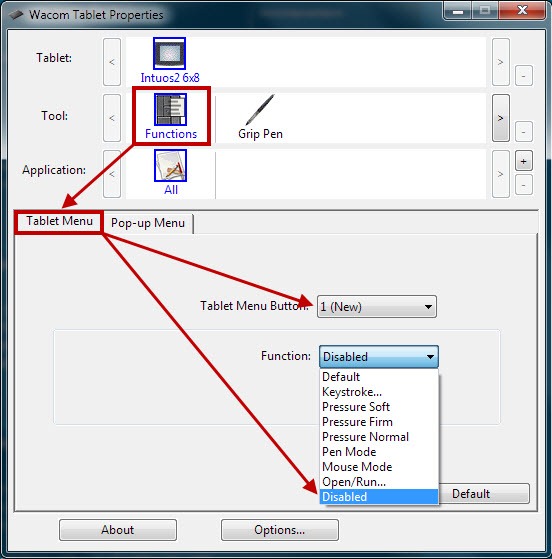
Wacom Tablet Properties application – aka – Wacom Driver Preferences
What about Intuos 3 and Intuos 4?
Other tablets in the Intuos line are apparently affected by this bug as well. Some in the Wacom forums have suggested that tablet buttons, touch strips and the new touch ring may cause the bug to appear as well. The updated driver released a few days ago may help solve the issue, but may not. I didn’t dig any further after fixing my own problem.
If you are affected and can’t find a fix, to change your mouse cursor back to the normal size, open the Mouse settings dialog from the Control Panel (simply called Mouse), select the Pointers tab and click the OK button to reset to your normal cursor theme.
Are there other solutions out there?
If any of you have any other solutions to the issue, or notice that the updated driver fixes the issue, add a comment to let everyone know.
This bug has been driving me crazy. I’m also using the Intuos 2. Now I can finally get back to painting in peace. Thank you so much. :)
Happy it has solved the issue for you. It drove me crazy too!
Nice one man :D I’ve been having this problem for a while and had heard that disabling the menu strip might solve it. Only had a quick look for single button though to disable the whole thing though; should have guessed.
Works a treat and the menu strip was rubbish anyway so hurrahs!
Ooh thank you. I would never have guessed that strip had anything to do with it. Strange. Luckily I never use it.
Move to another mouse-pointer set, other than the default..
This behaviour is limited to the default win7 mouse-pointer.
Other pointer-sets won’t change if you click on or rollover the upper bar on intuos 2 tablet..
!!
Good find!
! sorry for the mistake, my mentioned solution worked for me for a short time, but now it does not. :(
I have an Intuos2 tablet also and the same “mouse pointer gets larger” issue started happening to me.
First, some complaining…
The solution to disable (or not use) the tablet menu buttons is not what I consider a viable work-around: the Intuos comes with those buttons, so why shouldn’t users be able to use them? :)
More importantly, I’ve assigned a number of keystroke “macros”, the decision becomes whether to not use the tablet menu buttons or live with the large mouse pointers.
Also, I searched all over the web for a solution, and this is the only one mentioned. Even the Wacom forums don’t have another solution, though the postings in their forum ended back in January.
Now for some complimenting…
The solution listed by Janzz worked!
I added an extra step of clicking the “Save As” button to save the default mouse pointer scheme under a new name.
I then clicked some of the tablet menu buttons… the keyboard command I assigned ran fine and the mouse pointer did not change!
Thanks!