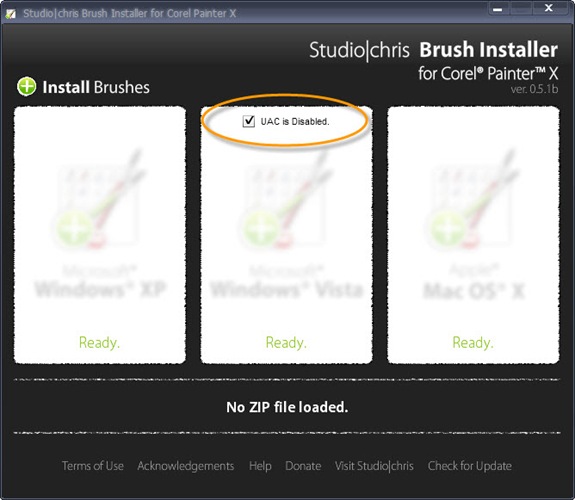
The Studio|chris Brush Installer for Corel Painter X has received its first update which is aimed specifically at Windows Vista users. This update brings compatibility with Vista’s User Access Control (UAC). If UAC is enabled on your system (which it is unless you’ve disabled it yourself), the Brush Installer will work “out of the box” by installing brushes to your specific user folder. Of note, this location is not a permanent location and custom brushes will be deleted by Painter if an emergency reset is needed (performed by holding the Shift key while starting Painter). In this event, at least you have an easy way to reinstall the lost brushes!
For those who have disabled UAC, the update still works out of the box for you as well, but you have an extra option. If the checkbox for “UAC is Disabled” is checked, your brushes will be installed to the Program Files directory as opposed to your specific user folder. Brushes installed to the Program Files directory are permanent and will not be deleted during emergency resets of Painter.
Sorry for the extra clutter in the interface, but a proper Settings panel is in the works to hide that checkbox when not needed and also to save whether the box has been checked or not between sessions. I felt it was important to release this intermediate update quickly without the Settings panel to ensure the installer is compatible with the majority of systems before moving on to more complex features.

Hi There,
Thanks for creating this handy tool. I’m a photoshop geek but brand new to Painter. I’m using Vista and after using your installer here is the path where my new brushes seem to be located.
D:\Program Files\Corel\Corel Painter X\Brushes\Painter Brushes\DEN\Den’s Oil Brushes
However Dens brushes don’t appear in my brushes Palette… Thanks in advance for any advice.
Julie
Hi Julie and thanks for stopping by and giving the Brush Installer a try. To fix the current installation of Den’s Brushes, go into the DEN folder and cut the Den’s Oil Brushes folder and the Den’s Oil Brushes.jpg category icon and paste them into the Painter Brushes folder (outside of the DEN folder with all the other brush categories) and delete the DEN folder. They should show up in Painter for you after that.
The reason the installer didn’t work for you is because the ZIP file downloaded for the brushes isn’t compatible (because of the DEN folder). More notes on this are at the end of the Brush Installer’s main page. I hope to integrate some file checking into the installer in a later version, as well as compatibility for other types of ZIP files (like the one you downloaded with the additional subfolder), but that isn’t available at the moment. Keep watching this space for updates though!
Hi again,
Thanks for the speedy response. I got it now. I had actually read the instructions and had tried getting rid of the extra Den folder, BUT I think i was missing the Den’s Oil Brushes.jpg in the main brushes folder… Doh!
Thanks again,
Julie